DELL 5548P Powerconnect Gigabit Managed Switch 48-PORTS
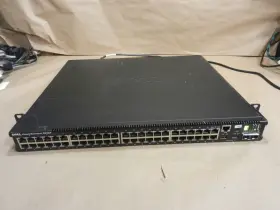
( Brand: Dell ), ( Manufacturer Part Number: 5548P ), ( Part Type: Switch ), ( Unit Type: Unit ), ( Network Ports: Ethernet )
Review DELL Powerconnect 48-ports Gigabit Managed Switch
The Dell PowerConnect 5548P is a robust and reliable 48-port Gigabit managed switch designed for small to medium-sized businesses and enterprise environments. This switch offers a robust feature set to ensure optimal network performance, security, and flexibility.
The Dell PowerConnect 5548P is equipped with 48 Gigabit Ethernet ports, capable of delivering high-speed data transfer rates for various network devices such as servers, workstations, and wireless access points. Each port supports IEEE 802.3af/at Power over Ethernet (PoE ), allowing you to power and connect devices like IP cameras, VoIP phones, and wireless access points without the need for separate power sources.
The switch features a comprehensive set of management tools to simplify network administration. It supports Dell Network Assistant, a user-friendly graphical user interface (GUI) that allows you to configure, monitor, and manage your network from a single platform. Additionally, the PowerConnect 5548P supports SNMP, Telnet, SSH, and Web-based management, enabling you to manage your network remotely.
In terms of security, the Dell PowerConnect 5548P offers advanced features such as 802.1X authentication, port security, and access control lists (ACLs) to protect your network from unauthorized access and intrusions. It also supports IP Source Guard and DHCP snooping to prevent unwanted devices from joining your network.
The PowerConnect 5548P is built with energy efficiency in mind, featuring energy-saving features such as Energy Efficient Ethernet (EEE) and Link Power Management (LPM) to reduce power consumption and lower your energy costs. It also supports Dell's Green Power Technology, which allows you to optimize power consumption based on the needs of your network.
In summary, the Dell PowerConnect 5548P is a powerful and versatile managed switch that delivers high-speed data transfer rates, advanced management tools, robust security features, and energy efficiency. It is an excellent choice for small to medium-sized businesses and enterprise environments looking for a reliable and feature-rich network solution.
Pros of buying Dell PowerConnect 5548P:1. High Capacity: This switch has 48 Gigabit Ethernet ports, which is ideal for medium to large-sized networks.
2. Managed Switch: It allows for advanced network configuration and management, such as VLANs, QoS, and link aggregation.
3. Energy Efficient: The switch has an Energy Star certified design, which means it consumes less power, saving on energy costs.
4. Reliability: Dell is a well-known and trusted brand, and the PowerConnect 5548P is built to provide reliable network performance.
5. Scalability: The switch can be easily upgraded or expanded, making it a long-term investment.
Cons of buying Dell PowerConnect 5548P:1. Price: Compared to unmanaged switches, managed switches like the PowerConnect 5548P are more expensive.
2. Complexity: Managed switches require more configuration and management than unmanaged switches, which may require additional technical skills or resources.
3. Limited Port Density: Although it has 48 ports, for larger networks, a switch with more ports may be required.
Conclusion:The Dell PowerConnect 5548P is a high-capacity, managed switch that offers advanced network configuration and management features, energy efficiency, reliability, and scalability. However, it is more expensive than unmanaged switches and may require additional technical skills or resources for configuration and management. If you have a medium to large-sized network and require advanced network management capabilities, the PowerConnect 5548P is a good investment. If you have a smaller network or are looking for an easier-to-use and less expensive option, an unmanaged switch may be more suitable.
Recommendation:If you have a medium to large-sized network and require advanced network management capabilities, the Dell PowerConnect 5548P is a recommended choice. However, carefully consider your network requirements and budget before making a decision.
Details:
Good used condition includes exactly whats pictured, pictured.
part #: 5548p prices
- $10.35-$69.99
specifications switchchunk:
- brand: Dell
- mpn: 5548p
- part type: Switch
- unit type: Unit
- network ports: Ethernet
shipping switchchunk:
- service: Economy
- type: Fixed
- class: Economy
- transit: 4-8 Days
- cost: $17.95
offer switchchunk:
- started: July 22, 2024
- options: Ship-to-home
- quantity: 1
- availability: In Stock
- sold: 0
general switchchunk:
- condition: Used
- Enterprise Networking, Servers > Switches Hubs > Switch Modules
payments switchchunk:
- cash
- wallet: Google-pay
- credit card: Mastercard
- other
seller switchchunk:
- rating: 97.1%
- city: Portland, Connecticut
- # reviews: 6478
returns switchchunk:
- method: Money back
- paid by: Buyer
- time: 30 Days
- policy: Returns Accepted
Dell 5548P Is Similar To:
- Dell 5508007630 Powerconnect 6200-xgsf 10ge Sfp Plus (54.2% similar) Are included besides what you see in the photograph.: Dell powerconnect 6200-XXIV 10GE SPF plus...(May 26th, 2024)
- Dell 5508006949 Powerconnect Stacking Module 0yy741 (54.7% similar) Dell powerconnect stacking module 0YY741. Are included besides what you see in the photograph...(May 26th, 2024)
- Dell M8024-k 10gb Powerconnect Switch For Poweredge M1000e (46% similar) Rest assured that you're getting a good deal when purchasing with us. No questions asked. Features: fast and free shipping you're already purchasing the item. Dell M8024-K 10GB powerconnect switch for power edge M1000E: this network module has been tested basic functionality and is in good...(May 28th, 2024)
- Dell 01c01h Blade Switch Df10mxl Force10 Mxl 10 40gbe (29.6% similar) Shipping and handling:: within the us via ups ground is free. Dell blade switch DF10MXL force 10 XML 10/40GBE 01C01H,: specification:: 01C01H used, good condition. Good luck and happy buying: specification: Dell blade switch DF10MXL force 10 XML 10/40GBE 01C01H...(May 29th, 2024)
- Dell Hpp69 P n 0hpp69 Pc8100 10gbase-t 10 Gigabit 4-port Switch Module (44.8% similar) Pulled from working units.tested...(May 31st, 2024)
- Dell 6200-xgbt Powerconnect 6200 m6200 Port Module Switch 10gb 10gbase-t X901c (48.1% similar) Includes: 1 Dell X901C. Dell X901C 0X901C 6200-LGBT 10GB up link module. Buyer agrees to pay $8 Dell powerconnect 6200/M6200 port module switch 6200-LGBT 10GB 10 HBase-t X901C. S/n: 0007A02...(June 1st, 2024)
- Dell Nv3p4 Poweredge 8-port 1gb Switch Module Server (56.1% similar) All Dell expansion boards/modules hardware is fully tested and ready to ship. Part number: NV3P4. Condition: used.: Dell NV3P4 power edge 8-PORT 1GB switch module server. Data sanitation: non-data device controlled status: cosmetic code: used good functional f4 fully tested...(July 5th, 2024)
- Dell 0h456k Brocade M5424 8gb 24-port Fibre Channel Fc Blade Switch For M1000e H456k (43.2% similar) 8GB 24-PORT fibre channel FCC. This includes items purchased in error. Please review the detailed specifications below. Dell brocade. R2V3 grading: c4 - F3. Blade switch for M1000E. 7A11-S3/18993. All key functions have been tested to be in working order...(July 5th, 2024)
- Dell Php6j U Php6j Powerconnect Pc8100-10gsfp Module Quad Port 10g Sfp (48% similar) They include the chassis, motherboard, and 1x pus only. Tape drives are further tested and at least one or both of the following, manufacturer software test back up exec. External cables and rails are not included unless specified. All refurbished items are tested by our engineers, in the case...(July 8th, 2024)
- Dell Dc4yg Kvm 2162ds 16 Ports Remote Console Switch 0dc4yg With Ear And Rail (31.8% similar) All the logos used are propriety to their respective owners and technology trader does not have any authority over them. Item condition refurbished means we pull the parts from working systems. Item condition new others means item pulled from brand new system and does not have original...(July 22nd, 2024)
- Dell M8428-k Defective 12 Port Sfp Network Blade Switch Module As-is (42.3% similar) Item condition: for parts or not working. Package length : 16.00 inches. This item is for parts or repair and will need to be repaired used for parts. Due to this items age and condition repairs will need be preformed prior operation. Accessories, remotes, software, power cords, cables...(August 10th, 2024)